Guide · tested on tmux 3.8 and 3.4
Oh my tmux!: install, customize and update
Oh my tmux! (the GitHub repository gpakosz/.tmux) is a ready-made tmux configuration with a Powerline-style status line, Ctrl+a as a second prefix and Vim-style pane keys. You install its .tmux.conf once and make every change in a separate .tmux.conf.local file.
On this page
Quick answer
How do I install Oh my tmux?
The project's installer clones the repository to ~/.local/share/tmux/oh-my-tmux, backs up your current config and links the new one. Run it outside tmux, as your normal user:
curl -fsSL "https://github.com/gpakosz/.tmux/raw/refs/heads/master/install.sh#$(date +%s)" | bashOr install it by hand in your home directory:
cd
git clone --single-branch https://github.com/gpakosz/.tmux.git
ln -s -f .tmux/.tmux.conf
cp .tmux/.tmux.conf.local .Then start tmux. Customize with Ctrl+b e, which opens ~/.tmux.conf.local in your editor.
What Oh my tmux is
Oh my tmux is one person's tmux setup, published by Gregory Pakosz (its copyright line starts in 2012). It is not a plugin and not part of tmux: it replaces your ~/.tmux.conf with a long file (2,132 lines in the version we tested) that sets options, rebinds keys and draws the status line with embedded shell code.
What you get, according to its README and what we saw when we loaded it: a Powerline-inspired status line with uptime, battery, user and host name (SSH and Mosh aware), Ctrl+a as a secondary prefix while Ctrl+b keeps working, a key to maximize any pane into its own window, a mouse toggle, copy to the system clipboard, and built-in TPM support. This is how it looks on a real tmux 3.8, installed with the manual steps above into a temporary home directory:
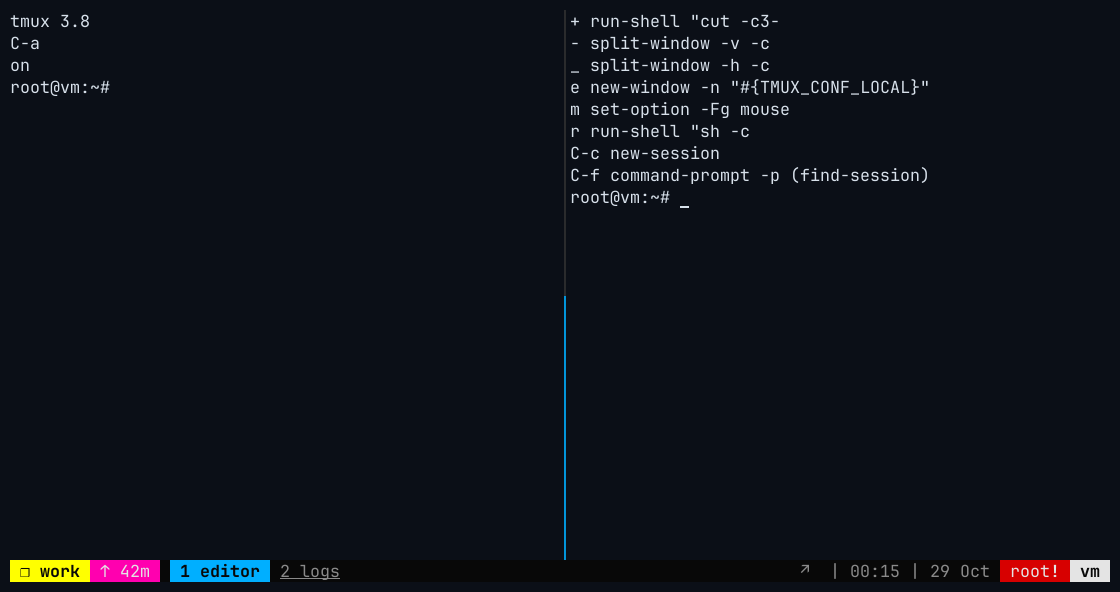
How this was captured
Captured 2026-10-29 00:15 UTC from a real xterm window running tmux 3.8 on Ubuntu 24.04. Nothing is mocked up. The commands that set up the screen:
# ~/.tmux.conf: # Oh my tmux! installed with the manual steps in a temporary home directory.
# ~/.tmux.conf: # Only change in .tmux.conf.local: tmux_conf_theme_terminal_title="tmux" (window title, so the screenshot tool finds the window)
# ~/.tmux.conf: set-environment -g TMUX_CONF /tmp/omt-home/.tmux.conf
# ~/.tmux.conf: set-environment -g TMUX_CONF_LOCAL /tmp/omt-home/.tmux.conf.local
# ~/.tmux.conf: source-file /tmp/omt-home/.tmux.conf
tmux new-session -d -s work -n editor -x 110 -y 25
tmux split-window -h -t work:editor
tmux new-window -d -t work -n logs
tmux send-keys -t work:editor.1 'clear; tmux -V; tmux show -gv prefix2; tmux show -gv mouse' Enter
tmux send-keys -t work:editor.2 'clear; tmux list-keys -T prefix | grep -E '"'"'prefix +(-|_|\+|m|e|r|C-c|C-f) '"'"' | awk '"'"'{print $4, $5, $6, $7}'"'"'' Enter
Install Oh my tmux
Requirements (from the README): tmux 2.6 or newer on Linux, macOS, FreeBSD, OpenBSD or Windows through WSL (Cygwin works but is slow and not recommended); awk, perl, grep and sed; and TERM=xterm-256color outside tmux. The installer also needs bash and git. Back up your own config first if you care about it.
curl -fsSL "https://github.com/gpakosz/.tmux/raw/refs/heads/master/install.sh#$(date +%s)" | bashWhen it is piped from curl, the script stops and offers to show you its own code before it runs, so it needs a real terminal. You can also download install.sh, read it, and run bash install.sh. Set DRY_RUN=true to print what it would do without changing anything.
cd
git clone --single-branch https://github.com/gpakosz/.tmux.git
ln -s -f .tmux/.tmux.conf
cp .tmux/.tmux.conf.local .This gives you ~/.tmux (the clone), ~/.tmux.conf (a symlink into it) and ~/.tmux.conf.local (your copy to edit).
git clone --single-branch https://github.com/gpakosz/.tmux.git ~/.local/share/tmux/oh-my-tmux
mkdir -p ~/.config/tmux
ln -s ~/.local/share/tmux/oh-my-tmux/.tmux.conf ~/.config/tmux/tmux.conf
cp ~/.local/share/tmux/oh-my-tmux/.tmux.conf.local ~/.config/tmux/tmux.conf.localIn the XDG location the files have no leading dot. With $XDG_CONFIG_HOME set, use "$XDG_CONFIG_HOME/tmux" instead of ~/.config/tmux. The clone can live anywhere; this path is the one the installer uses.
What the installer does, read from install.sh at commit 58a3dcc (8 August 2026):
Checks it is safe to run
It refuses to run as root, without
bash, withouttmux,git,perl,sedorawk, and from inside tmux ("tmux is currently running, please terminate the server"; setPERMISSIVE=trueto override).Picks a location
$XDG_CONFIG_HOME/tmux/tmux.confifXDG_CONFIG_HOMEis set, otherwise~/.config/tmux/tmux.confif~/.configexists, otherwise~/.tmux.conf. On most Linux desktops~/.configexists, so you get the XDG location. The repository is cloned to~/.local/share/tmux/oh-my-tmux.Backs up what is there
Existing
~/.tmux.conf,~/.tmux.conf.localand the XDG files are renamed with a timestamp suffix such as~/.tmux.conf.20261028175812.4242. Old symlinks are deleted. The whole~/.config/tmuxand~/.tmuxdirectories are renamed the same way.Links the config and copies the .local file
It symlinks the config file to the clone's
.tmux.confand copies.tmux.conf.localnext to it, ready for you to edit.
We ran the manual home-directory install on 28 October 2026 in a temporary home directory with tmux 3.8 and with Ubuntu's tmux 3.4: both started without configuration errors (3.4 logged one harmless "no current client" message from Oh my tmux's background setup). The sandbox we test in does not allow piping a remote script into a shell, so the installer itself was read, not run.
What it changes in tmux
Values read with show-options after loading Oh my tmux with no edits to .tmux.conf.local, compared with a tmux 3.8 server with no config:
| Option | tmux 3.8 default | With Oh my tmux |
|---|---|---|
prefix2 | None | C-a (both Ctrl+b and Ctrl+a work) |
base-index, pane-base-index | 0 | 1 |
renumber-windows | off | on |
history-limit | 2000 | 5000 |
status-interval | 15 | 10 |
display-time, repeat-time | 750, 500 | 1000, 600 |
set-titles, monitor-activity, focus-events | off | on |
mouse | on | unchanged: on with tmux 3.8, off with 3.7 and older (toggle with Ctrl+b m) |
mode-keys | emacs, or vi if $EDITOR/$VISUAL contains "vi" | unchanged: set EDITOR=vim to get vi keys |
| Status line | Green bar, [session] on the left | Powerline-style sections from tmux_conf_theme_* variables |
Oh my tmux key bindings
<prefix> below means Ctrl+b or Ctrl+a. Every key was checked with list-keys on tmux 3.8. The third column shows what the same key does in stock tmux 3.8, so you know what you give up:
| Keys | Oh my tmux | Stock tmux 3.8 |
|---|---|---|
<prefix> e | Edit .tmux.conf.local, then reload | Unbound |
<prefix> r | Reload the configuration | Redraw the client |
Ctrl+l (no prefix) | Clear the screen and the tmux history | Passed to the program |
<prefix> - / _ | Split top/bottom / left/right, in the current directory | Delete buffer / unbound |
<prefix> h j k l | Select the pane left, down, up, right | l = last window |
<prefix> H J K L | Resize the pane (repeatable) | L = last session |
<prefix> < / > | Swap the pane up / down | Window / pane menus |
<prefix> + | Maximize the pane into its own window (press again to restore) | Unbound |
<prefix> m | Toggle the mouse | Mark the pane |
<prefix> Ctrl+h / Ctrl+l | Previous / next window | Unbound |
<prefix> n / p | n unbound; p pastes the top buffer | Next / previous window |
<prefix> Tab | Last active window | Window switcher (new in 3.8) |
<prefix> Shift+Tab | Last active session | Session switcher (new in 3.8) |
<prefix> Ctrl+c / Ctrl+f | New session / find a session by name | Unbound |
<prefix> Enter | Copy mode | Unbound ([ still works) |
<prefix> b / P | List buffers / choose a buffer to paste | Unbound |
<prefix> U / F | Open URLs with urlscan or urlview / paths with PathPicker, if installed | Unbound |
In vi copy mode, v starts a selection, Ctrl+v toggles block selection, H and L jump to the start and end of the line, y copies and Escape cancels. The new tmux 3.8 keys that Oh my tmux does not touch, such as Ctrl+b * for a floating pane and Ctrl+b @, keep working. To keep every stock binding and only add Oh my tmux keys that do not clash, set tmux_conf_preserve_stock_bindings=true in .tmux.conf.local; with it, n, p, l, m, - and Tab were back to the stock commands in our test. All default tmux keys are on the cheat sheet.
Customize it in .tmux.conf.local
Quick answer
Where do I put my own settings?
In ~/.tmux.conf.local (or ~/.config/tmux/tmux.conf.local), never in the main .tmux.conf: that file is a symlink into the git clone and is replaced when you update. Press Ctrl+b e to open it in $VISUAL or $EDITOR (vim if neither is set); tmux reloads when you quit the editor.
The file has two kinds of lines. Shell-style variables such as tmux_conf_theme_status_left="…" are read by Oh my tmux's own code, and normal tmux commands go in the user customizations section near the end:
# More scrollback and the status line at the top
set -g history-limit 50000
set -g status-position top

# Use only Ctrl+a as the prefix
set -gu prefix2
unbind C-a
unbind C-b
set -g prefix C-a
bind C-a send-prefix

# If Oh my tmux overrides a line, mark it #!important
bind c new-window -c '#{pane_current_path}' #!important
Lines ending in #!important are applied again after Oh my tmux has set itself up, which is the fix when one of your set, bind or unbind lines seems to be ignored. In our test, set -g history-limit 20000 #!important and a plain set -g status-position top both took effect.
Useful variables, all in the same file:
| Variable | Values | Effect |
|---|---|---|
tmux_conf_new_pane_retain_current_path | true (default), false | New panes open in the current directory |
tmux_conf_new_window_retain_current_path | false (default), true | Same for new windows |
tmux_conf_copy_to_os_clipboard | false (default), true | Copy mode also copies to the system clipboard (needs xsel, xclip or wl-copy on Linux) |
tmux_conf_24b_colour | auto (default), true, false | 24-bit color; auto checks COLORTERM |
tmux_conf_theme | enabled (default), disabled | Turn the whole theme off and style tmux yourself |
tmux_conf_preserve_stock_bindings | false (default), true | Keep tmux's own key bindings |
tmux_conf_theme_highlight_focused_pane | false (default), true | Give the active pane a different background |
tmux_conf_theme_pane_border_style | thin (default), fat | Pane border thickness |
Theme colors
The theme uses 17 numbered colors, tmux_conf_theme_colour_1 to tmux_conf_theme_colour_17, which the other tmux_conf_theme_* variables refer to. Change a number to recolor everything that uses it. The sample file also has a commented "ansi" set that uses your terminal's palette instead of fixed hex colors:
tmux_conf_theme_colour_4="#00afff"    # light blue: current window, active border
tmux_conf_theme_colour_5="#ffff00"    # yellow: session name, messages
tmux_conf_theme_colour_10="#ff00af"   # pink: uptime section
tmux_conf_theme_colour_16="#d70000"   # red: user name section
Status line and Powerline separators
The left and right parts come from tmux_conf_theme_status_left and tmux_conf_theme_status_right. A | starts a new colored section and a , a sub-section. Normal tmux formats work, plus Oh my tmux's own variables such as #{battery_percentage}, #{battery_bar}, #{uptime_d}, #{loadavg}, #{hostname_ssh}, #{username}, #{pretty_pane_current_path}, #{prefix}, #{mouse} and #{synchronized}:
tmux_conf_theme_status_left=" ❐ #S | #{pretty_pane_current_path} "
tmux_conf_theme_status_right=" #{prefix}#{mouse} , %R , %d %b | #{username}#{root} | #{hostname} "
These strings go through strftime like tmux's own status-left, so write %% for a literal percent sign. For the Powerline arrow look you need a font with Powerline symbols (a patched or Nerd Font, or PowerlineSymbols.otf), not the Powerline program. Then set the separators:
tmux_conf_theme_left_separator_main=''
tmux_conf_theme_left_separator_sub=''
tmux_conf_theme_right_separator_main=''
tmux_conf_theme_right_separator_sub=''You can add your own #{name} variables by writing POSIX shell functions at the end of the file, below the # EOF line, as the sample file explains.
Use TPM plugins with Oh my tmux
Oh my tmux has TPM support built in. List plugins in .tmux.conf.local with the usual syntax, and do not add set -g @plugin 'tmux-plugins/tpm' or the run '~/.tmux/plugins/tpm/tpm' line anywhere:
set -g @plugin 'tmux-plugins/tmux-resurrect'
set -g @plugin 'tmux-plugins/tmux-continuum'
set -g @continuum-restore 'on'
Plugins are installed and updated automatically when tmux starts and when you reload (turn that off with tmux_conf_update_plugins_on_launch=false and tmux_conf_update_plugins_on_reload=false). The keys differ slightly from plain TPM: Ctrl+b I installs, Ctrl+b u (lowercase) updates and Ctrl+b Alt+u removes plugins you deleted from the list. Plugins go to ~/.tmux/plugins, or to plugins next to tmux.conf in the XDG layout. Variables that plugins add to the status line can be used in tmux_conf_theme_status_right. Full status-line themes such as Catppuccin fight with Oh my tmux's own theme, so use one or the other. General plugin advice: Plugins & TPM.
Update Oh my tmux
The README has no update section, but the setup makes it simple: your config file is a symlink into a git clone, so updating is a git pull in that clone, then a reload.
# Manual install in your home directory
git -C ~/.tmux pull
# Installed with install.sh (or the XDG manual steps above)
git -C ~/.local/share/tmux/oh-my-tmux pull
# Then reload, or press prefix r inside tmux
tmux source-file ~/.tmux.confYour .tmux.conf.local is a copy, so updates never change it, and new variables from the sample file do not appear in your copy. To see what changed, compare the two: diff ~/.tmux.conf.local ~/.tmux/.tmux.conf.local. Running the installer again also works, but it moves your current .tmux.conf.local to a timestamped backup and gives you a fresh copy.
Uninstall and restore your old config
Remove the symlink, the clone and your .local file, put your backup back, and restart the tmux server so none of the old settings linger:
rm ~/.tmux.conf ~/.tmux.conf.local
rm -rf ~/.tmux
tmux kill-server~/.tmux also holds plugins Oh my tmux installed; keep it if you want them.
rm ~/.config/tmux/tmux.conf ~/.config/tmux/tmux.conf.local
rm -rf ~/.local/share/tmux/oh-my-tmux
# Restore the backup the installer made (pick your timestamp)
ls -d ~/.tmux.conf.* ~/.config/tmux.* ~/.tmux.[0-9]* 2>/dev/null
mv ~/.tmux.conf.20261028175812.4242 ~/.tmux.conf
tmux kill-serverIf the installer used ~/.tmux.conf instead (no ~/.config folder), remove ~/.tmux.conf and ~/.tmux.conf.local instead. A renamed ~/.tmux.<timestamp> folder holds your old TPM plugins; move it back to ~/.tmux.
rm ~/.config/tmux/tmux.conf ~/.config/tmux/tmux.conf.local
rm -rf ~/.local/share/tmux/oh-my-tmux
tmux kill-servertmux kill-server closes every session. To keep working while you switch, start a fresh server for the new setup with tmux -L clean and stop the old one later.
Troubleshooting
- Something looks wrong and you are not sure it is Oh my tmux
Stop all tmux servers and start one with no config:
tmux -f /dev/null -L test. If the problem is still there, it is tmux or your terminal (see troubleshooting); if not, it is the config.- A
setorbindin.tmux.conf.localhas no effect Put it in the user customizations section and add
#!importantat the end of the line.- "tmux is currently running, please terminate the server"
The installer will not run inside tmux. Leave tmux (detach or exit) and run it from a plain terminal, or run it with
PERMISSIVE=trueand accept that existing sessions keep outdated environment variables.- "Do not execute this script as root!"
Run it as the user who will use tmux, without
sudo.- Boxes or question marks instead of arrows
Your font lacks the Powerline symbols. Install a patched or Nerd Font and select it in your terminal, or set the four separator variables back to empty strings.
- The status line is broken or duplicated at the bottom
The README blames a mismatch in character width tables (glib 2.50.1+ with glibc older than 2.26 on Linux, or iTerm2's "Use Unicode version 9 character widths" setting). Use a UTF-8 locale (
LC_CTYPE) and avoid emoji in the status variables.- The mouse does not work
Oh my tmux leaves the mouse at tmux's default, which is off before tmux 3.8. Press Ctrl+b m, or add
set -g mouse onto the user section.- High CPU on Windows
The config runs many shell commands, and forking is slow under Cygwin. The author recommends WSL with Windows Terminal; see tmux on Windows.
Oh my tmux vs your own config vs a theme plugin
| Oh my tmux | Your own .tmux.conf | TPM theme (Catppuccin, Dracula…) | |
|---|---|---|---|
| Setup | One command | Write it, or use the generator | TPM plus a few lines |
| Size | 2,132-line config plus a 522-line .local file | Usually 10 to 60 lines | Your config plus the plugin's scripts |
| Changes key bindings | Many (can be turned off) | Only what you choose | Rarely |
| Status line | Powerline style, battery, uptime, SSH-aware host | Whatever you write | Polished themes with modules |
| Debugging | Hard: options are set by shell code at runtime | Easy: every line is yours | Moderate |
| Startup cost | Runs shell, awk and perl on start and reload | None | Plugin scripts on start |
| Works on | tmux 2.6+ | Any version you target | Depends on the plugin (Catppuccin: 3.2+) |
Source: github.com repository pages, 2026-10-28
Show the data
| Repository | Stars |
|---|---|
| Oh my tmux! (gpakosz/.tmux) | 25.5k |
| catppuccin/tmux | 3.2k |
| nordtheme/tmux | 1.2k |
| dracula/tmux | 856 |
| rose-pine/tmux | 280 |
Pick Oh my tmux if you want a complete, good-looking setup today and are happy to learn its keys. Write your own config if you want to know what every line does, keep tmux's standard keys (useful when you also work on servers with stock tmux), or run a recent tmux whose new defaults already cover most of what Oh my tmux adds: tmux 3.8 turns the mouse on and has built-in light and dark themes. A short config plus a theme plugin sits in between. Start from the config reference or the config generator.
Frequently asked questions
What is Oh my tmux?
A popular ready-made tmux configuration by Gregory Pakosz, hosted at github.com/gpakosz/.tmux. It replaces your .tmux.conf and is customized through a separate .tmux.conf.local file. It is not an official tmux project and not a plugin.
What is the prefix key in Oh my tmux?
Both: Ctrl+b stays the prefix and Ctrl+a is added as the secondary prefix (prefix2). To use only Ctrl+a, add set -gu prefix2, unbind C-a, unbind C-b, set -g prefix C-a and bind C-a send-prefix to the user section of .tmux.conf.local.
Where is the Oh my tmux config file?
The main file is ~/.tmux.conf (or ~/.config/tmux/tmux.conf), a symlink into the git clone at ~/.tmux or ~/.local/share/tmux/oh-my-tmux. Your settings live in ~/.tmux.conf.local (or ~/.config/tmux/tmux.conf.local). Ctrl+b e opens it.
How do I reload Oh my tmux after editing?
Press Ctrl+b r. Editing through Ctrl+b e reloads automatically when you close the editor.
Does Oh my tmux work with tmux 3.8?
Yes. We loaded it on tmux 3.8 and 3.4 with no errors. On 3.8 it replaces the new Ctrl+b Tab and Ctrl+b Shift+Tab switchers with "last window" and "last session"; floating pane keys such as Ctrl+b * still work.
Can I use the tmux.app config generator with Oh my tmux?
Not as a whole file, since Oh my tmux owns .tmux.conf. Copy individual set and bind lines from the generator into the user section of .tmux.conf.local.
Keep learning
Something wrong or out of date on this page? Email hello@tmux.app and we will fix it.