Releases · changelog
tmux versions and changelog: the latest release is 3.8
The latest tmux version is 3.8, tagged on 8 October 2026. Run tmux -V to see yours. This page explains what changed in each recent release in plain language, flags the changes that can surprise you after an upgrade, and shows how to upgrade on every OS without ending up with an old server still running.
On this page
- What is the latest version of tmux?
- How to check your tmux version (client and server)
- What changes when you upgrade to 3.8?
- What's new in tmux 3.8
- What's new in tmux 3.7 (June 2026)
- What's new in tmux 3.6 (November 2025)
- What's new in tmux 3.5 (September 2024)
- Which tmux version does your OS ship?
- How to upgrade tmux
- tmux version history
- tmux version FAQ
What is the latest version of tmux?
Quick answer
What is the current tmux version?
tmux 3.8, released 8 October 2026. The release before it was the 3.7c bug-fix release on 17 August 2026. Check your own version with:
tmux -V
tmux 3.8The official sources are the CHANGES file (the full changelog, maintained by the tmux authors) and the GitHub releases page, which has the source tarball for each version. Version numbers are simple: 3.8 is a feature release and a letter (3.7a, 3.7b, 3.7c) marks a bug-fix release of the same series. There is no 4.0 announced; after 3.9 comes whatever the developers decide.
How to check your tmux version (client and server)
There are two versions to know, and after an upgrade they can differ:
| Command | Shows | Example |
|---|---|---|
tmux -V | The client: the tmux program on disk, found in your PATH | tmux 3.8 |
tmux display -p '#{version}' | The server: the tmux process that holds your sessions | 3.4 |
tmux --version does not work (tmux only accepts -V), and builds from Git report next-3.9. The server is started once and keeps running until it is killed, so after a package upgrade the new client can be talking to an old server. That is exactly what this real screenshot shows: Ubuntu's tmux 3.4 server still running, with a freshly installed 3.8 client in the PATH.
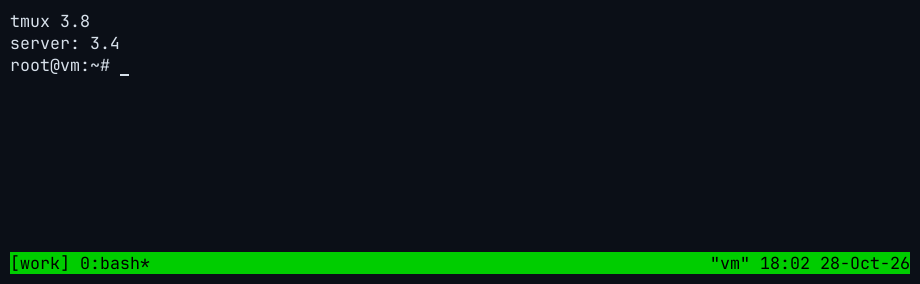
How this was captured
Captured 2026-10-28 18:02 UTC from a real xterm window running tmux 3.4 on Ubuntu 24.04. Nothing is mocked up. The commands that set up the screen:
tmux new-session -d -s work -x 90 -y 11
tmux send-keys -t work 'clear; tmux -V; tmux display -p '"'"'server: #{version}'"'"'' Enter
The status line color is a giveaway: plain green is the pre-3.8 default, yellow-green is 3.8's new theme. If the two versions differ, restart the server as described in How to upgrade tmux.
What changes when you upgrade to 3.8?
Pick the version you have now. The list shows what you gain, and which defaults change under you, when you move to 3.8. Ubuntu 24.04 users are on 3.4, Ubuntu 22.04 and RHEL 9 users on 3.2a.
- 3.8defaultThe mouse is on by default: click panes, drag borders, scroll.
set -g mouse offrestores the old behavior. - 3.8defaultBuilt-in light and dark themes (
theme detect); the status line is nowbg=themegreen,fg=themeblack.set -g theme terminalbrings back the old colors. Themes - 3.8changedLayout strings (
#{window_layout}) use a JSON format. Old strings are still accepted byselect-layout, but scripts that parse the output need updating. - 3.8removed
display-panes -b(now an error), the copy-moderefresh-from-panecommand (userefresh-now, bound to r) and theactive-paneclient flag. - 3.8newFloating panes can be moved, resized, tiled (Ctrl+b @), swapped and made modal (
new-pane -O); move and resize keys live under Ctrl+b g. Floating panes - 3.8newFuzzy switcher: Ctrl+b Tab for windows, Ctrl+b Shift+Tab for sessions. Ctrl+b T sets the pane title.
- 3.8newEvent hooks and monitors (
set-hook -B), OSC 133 command-start and command-finish events,clear-on-attach, copy mode that refreshes live,capture-pane -Iwith timestamps. - 3.7newFloating panes arrive:
new-pane, bound to Ctrl+b * (mouse-only moving in 3.7). - 3.7newLine numbers in copy mode (
copy-mode-line-numbers),focus-follows-mouse, synchronized output (DECSET 2026) against screen tearing, sortablelist-keys -O. - 3.7changedMessages are drawn with the new
message-format; a custommessage-styleneedsfill=…to cover the whole line. Changinghistory-limitnow applies to existing panes too. - 3.7changedWith vi keys, the copy-mode cursor no longer moves into the invisible cell past the end of the line, closer to Vim.
- 3.6newPane scrollbars (
pane-scrollbars), nicer default second and third status lines,tiled-layout-max-columns. - 3.6newCase-insensitive search in tree and other modes, automatic light/dark theme reporting to programs (mode 2031),
codepoint-widthsto fix emoji widths. - 3.5default
escape-timedrops from 500 ms to 10 ms: no more lag after Esc in Vim. Many configs still set this by hand and no longer need to. - 3.5changedExtended keys reworked to match xterm (new
extended-keys-format); if modified keys such as Ctrl+Enter misbehave after upgrading, look here first. - 3.5new
prefix-timeout, mirrored main-horizontal and main-vertical layouts (Ctrl+b Alt+6, Ctrl+b Alt+7),allow-set-title, acommand-errorhook. - 3.4newOSC 8 hyperlinks, SIXEL images (when built with
--enable-sixel), OSC 133 prompt marks to jump between commands in copy mode, menu styles. - 3.3newPopup borders, styles and titles.
- 3.3defaultBuilds pick
tmux-256colorasdefault-terminalwhen the system has it (before:screen).
Summarized from the official CHANGES file; defaults checked on real tmux 3.4 and 3.8 builds with no config file.
What's new in tmux 3.8
tmux 3.8 (8 October 2026) is one of the largest releases in years. The headline is that floating panes, introduced in 3.7, are now complete, plus built-in themes and an event system for hooks.
- Floating panes, finished. Move and resize them from the keyboard (Ctrl+b g table) or mouse, tile and float with Ctrl+b @,
swap-pane,break-paneandjoin-panework with them, Ctrl+drag creates one, andnew-pane -Omakes a modal pane that blocks the others. Floating panes guide. - Themes. A
themeoption (detect,terminal,light,dark) and color names such asthemegreenin styles. Theme config. - Switcher.
switch-mode, bound to Ctrl+b Tab (windows) and Ctrl+b Shift+Tab (sessions). - Hooks as events.
set-hook -Bmonitors a format every second,wait-for -Ewaits for events, and new hooks cover pane activity, moves, resizes and OSC 133 shell prompts. Scripting guide. - Customize mode (Ctrl+b C) shows hooks and environment, opens values in an editor with e, and filters to changed items with C.
- Smaller additions: auto-hiding scrollbars,
clear-on-attach, live-refreshing copy mode (refresh-on, r to refresh once),capture-pane -I,new-window -Efor an empty pane,remain-on-exit failed-key,kill-session -a -ffilters, Ctrl+b T for pane titles, and left/right margin support for WezTerm and Ghostty.
What's new in tmux 3.7 (June 2026)
3.7 was tagged on 26 June 2026, followed by bug-fix releases 3.7a and 3.7b (1 July) and 3.7c (17 August; on macOS it builds with jemalloc to avoid a calloc bug).
- Floating panes: panes that sit above the layout like popups but behave like normal panes. Create one with
new-pane, bound to Ctrl+b *. In 3.7 they could only be moved and resized with the mouse. - Copy mode line numbers with
copy-mode-line-numbers(absolute,relative,hybrid). Copy mode guide. message-formatcontrols how messages and prompts are drawn; they can now cover only part of the status line.- Synchronized output (DECSET 2026) so fast-updating programs such as AI agents and TUIs do not tear.
focus-follows-mouse,get-clipboard,remain-on-exit key,kill-session -gfor session groups,run-shellarguments as#{1}, and sorting with-Oforlist-keysand the list commands.
What's new in tmux 3.6 (November 2025)
3.6 was tagged on 26 November 2025; 3.6a (5 December 2025) fixed a crash and several regressions, and 3.6b (20 May 2026) fixed image handling. Ubuntu 26.04 LTS ships 3.6a.
- Pane scrollbars:
set -g pane-scrollbars on(ormodalfor copy mode only), with position and style options. - Theme reporting: tmux tells programs whether the terminal is light or dark (mode 2031), guessing from the background when the terminal cannot say.
- Nicer default second and third status lines,
tiled-layout-max-columns, case-insensitive search in modes,codepoint-widthsandvariation-selector-always-widefor emoji,default-client-command, theno-detach-on-destroyclient option, and OSC 52 detection from the terminal's device attributes.
What's new in tmux 3.5 (September 2024)
3.5 was tagged on 27 September 2024, and 3.5a on 5 October 2024 (Debian 13 ships 3.5a).
escape-timedefaults to 10 ms instead of 500 ms. This removes the delay after Esc that Vim users used to fix by hand.- Extended keys revamp to match xterm more closely, with
extended-keys-format. - Mirrored
main-horizontalandmain-verticallayouts,prefix-timeout,allow-set-title, thecommand-errorhook,copy-mode -dand hyperlinks shown in copy mode. - 3.5a reverted one 3.5 change:
#(),run-shellandif-shelluse/bin/shagain;default-shellapplies only to popups.
For 3.4 and earlier, see the version history below and the CHANGES file.
Which tmux version does your OS ship?
Most people run whatever their package manager installed. On 28 October 2026:
| System | tmux version | Behind 3.8 by |
|---|---|---|
| macOS: Homebrew, MacPorts | 3.8 | current |
| Arch Linux, Fedora 44, openSUSE Tumbleweed, Gentoo | 3.8 | current |
| Windows: MSYS2 | 3.8 | current |
| Fedora 43, Alpine 3.24, Debian 13 backports | 3.7c | 1 release |
| Official static binaries (tmux-builds) | 3.7c | 1 release |
| Ubuntu 26.04 LTS (and the default WSL install) | 3.6a | 6 releases |
| Debian 13, openSUSE Leap 16.0 | 3.5a | 8 releases |
| Ubuntu 24.04 LTS | 3.4 | 10 releases |
| Debian 12, RHEL / Rocky / Alma 10 | 3.3a | 11 releases |
| Ubuntu 22.04 LTS, RHEL / Rocky / Alma 9 | 3.2a | 13 releases |
| Windows: Cygwin (stable) | 3.3a | 11 releases |
Full per-distribution tables are on the Linux install page, with the macOS and Windows equivalents.
How to upgrade tmux
Upgrading is two steps: install the new version with the same tool you used before, then restart the tmux server. Pick your system:
brew update && brew upgrade tmux
tmux kill-serverMacPorts: sudo port selfupdate && sudo port upgrade tmux. More on macOS.
sudo apt update && sudo apt install --only-upgrade tmux
tmux kill-serverFedora: sudo dnf upgrade tmux; Arch: sudo pacman -Syu. On an LTS release this only brings bug and security fixes, never a new tmux version. For 3.8 on Ubuntu 24.04 or 22.04, build from source or use the static binary.
sudo apt update && sudo apt upgrade
tmux kill-serverMSYS2: pacman -Syu. psmux: winget upgrade psmux. More on Windows.
Why you must restart the server after upgrading
tmux is a client and a server. The server is the long-running process that owns your sessions; it was started from the old binary and keeps running that code after the package manager replaces the file on disk. When the client and server versions use different protocols, the new client cannot talk to the old server at all. This real capture shows the opposite case, an old 3.4 client meeting a running 3.8 server:
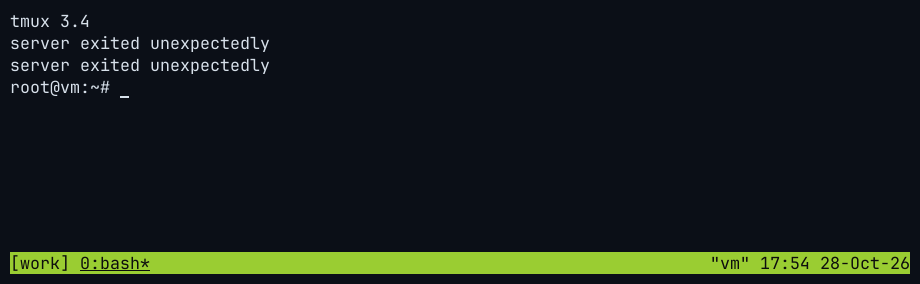
How this was captured
Captured 2026-10-28 17:54 UTC from a real xterm window running tmux 3.8 on Ubuntu 24.04. Nothing is mocked up. The commands that set up the screen:
tmux new-session -d -s work -x 90 -y 11
tmux send-keys -t work 'clear; tmux -V; tmux display -p '"'"'#{version}'"'"'; tmux ls' Enter
"server exited unexpectedly" is misleading here: we checked, and the 3.8 server was still running with its session intact. The client just could not speak its protocol. Other combinations print protocol version mismatch (client N, server M), or they work but you are silently still on old defaults (as in the screenshot above).
tmux kill-server
tmux new -s main
tmux display -p '#{version}'
3.8kill-server ends every session and the programs in them, so save your work first. To keep long jobs alive, start the new version on a separate socket and move over when they finish: tmux -L new runs a second, independent server. To bring back windows and layouts after a restart, use tmux-resurrect. Before upgrading across several versions, run through what changes above.
tmux version history
tmux was started by Nicholas Marriott in 2007; the first tagged release, 0.8, is from April 2009. 2026 has been the busiest year since then: six releases (3.6b to 3.8) and more commits than any year except 2009.
Source: git tag dates in github.com/tmux/tmux
Show the data
| Version | Tagged | Highlights |
|---|---|---|
| 0.8 | 2009-04-21 | |
| 0.9 | 2009-07-02 | |
| 1.0 | 2009-09-20 | |
| 1.1 | 2009-11-05 | |
| 1.2 | 2010-03-10 | |
| 1.3 | 2010-07-18 | |
| 1.4 | 2010-12-27 | |
| 1.5 | 2011-07-09 | |
| 1.6 | 2012-01-23 | |
| 1.7 | 2012-10-13 | |
| 1.8 | 2013-03-26 | |
| 1.9 | 2014-02-20 | |
| 1.9a | 2014-02-22 | |
| 2.0 | 2015-05-05 | |
| 2.1 | 2015-10-18 | Mouse options merged into the single mouse option |
| 2.2 | 2016-04-11 | |
| 2.3 | 2016-09-29 | |
| 2.4 | 2017-04-20 | Key tables reworked: mode tables merged into the main key tables (copy-mode, copy-mode-vi) |
| 2.5 | 2017-05-29 | |
| 2.6 | 2017-10-05 | |
| 2.7 | 2018-04-03 | |
| 2.8 | 2018-10-17 | |
| 2.9 | 2019-04-24 | Old -fg / -bg / -attr options removed in favour of -style options |
| 2.9a | 2019-05-01 | |
| 3.0 | 2019-06-14 | New {} brace syntax for commands in the config file |
| 3.0a | 2019-12-01 | |
| 3.1 | 2020-02-04 | ~/.config/tmux/tmux.conf supported as a config location |
| 3.1a | 2020-04-27 | |
| 3.1b | 2020-04-30 | |
| 3.1c | 2020-10-30 | |
| 3.2 | 2021-04-13 | display-popup (popups); $XDG_CONFIG_HOME/tmux/tmux.conf searched; extended-keys option |
| 3.2a | 2021-06-10 | |
| 3.3 | 2022-06-01 | Popup borders, styles and titles; Builds pick tmux-256color as default-terminal when available |
| 3.3a | 2022-06-09 | |
| 3.4 | 2024-02-13 | OSC 8 hyperlinks; SIXEL images (with --enable-sixel); menu-style and menu-border-style |
| 3.5 | 2024-09-27 | Default escape-time reduced from 500 ms to 10 ms; prefix-timeout option; Mirrored main-horizontal / main-vertical layouts; Extended keys revamp |
| 3.5a | 2024-10-05 | |
| 3.6 | 2025-11-26 | Pane scrollbars (pane-scrollbars); Nicer default second and third status lines; tiled-layout-max-columns; Case-insensitive search in modes |
| 3.6a | 2025-12-05 | |
| 3.6b | 2026-05-20 | |
| 3.7 | 2026-06-26 | Floating panes: new-pane, bound to Prefix *; Copy-mode line numbers; message-format option; list-keys -O sorting |
| 3.7a | 2026-07-01 | |
| 3.7b | 2026-07-01 | |
| 3.7c | 2026-08-17 | |
| 3.8 | 2026-10-08 | Floating panes can be moved, resized, tiled and swapped; modal panes (new-pane -O); Built-in light and dark themes (theme option); switch-mode fuzzy switcher on Prefix Tab / Prefix S-Tab; mouse now defaults to on; Event-based hooks and monitors (set-hook -B); Layout strings use a JSON subset; clear-on-attach option, copy-mode auto refresh, capture-pane -I |
Source: git log of github.com/tmux/tmux, counted 28 Oct 2026 (2026 = year to date)
Show the data
| Year | Commits |
|---|---|
| 2007 | 372 |
| 2008 | 269 |
| 2009 | 1,941 |
| 2010 | 575 |
| 2011 | 485 |
| 2012 | 507 |
| 2013 | 519 |
| 2014 | 292 |
| 2015 | 683 |
| 2016 | 416 |
| 2017 | 844 |
| 2018 | 343 |
| 2019 | 873 |
| 2020 | 979 |
| 2021 | 563 |
| 2022 | 302 |
| 2023 | 191 |
| 2024 | 279 |
| 2025 | 346 |
| 2026 | 1,834 |
| Version | Tagged | Highlights |
|---|---|---|
| 3.8 latest | Floating panes can be moved, resized, tiled and swapped; modal panes (new-pane -O); Built-in light and dark themes (theme option); switch-mode fuzzy switcher on Prefix Tab / Prefix S-Tab; mouse now defaults to on; Event-based hooks and monitors (set-hook -B); Layout strings use a JSON subset; clear-on-attach option, copy-mode auto refresh, capture-pane -I details | |
| 3.7c | Bug fixes | |
| 3.7b | Bug fixes | |
| 3.7a | Bug fixes | |
| 3.7 | Floating panes: new-pane, bound to Prefix *; Copy-mode line numbers; message-format option; list-keys -O sorting details | |
| 3.6b | Bug fixes | |
| 3.6a | Bug fixes | |
| 3.6 | Pane scrollbars (pane-scrollbars); Nicer default second and third status lines; tiled-layout-max-columns; Case-insensitive search in modes details | |
| 3.5a | Bug fixes | |
| 3.5 | Default escape-time reduced from 500 ms to 10 ms; prefix-timeout option; Mirrored main-horizontal / main-vertical layouts; Extended keys revamp details | |
| 3.4 | OSC 8 hyperlinks; SIXEL images (with --enable-sixel); menu-style and menu-border-style | |
| 3.3a | Bug fixes | |
| 3.3 | Popup borders, styles and titles; Builds pick tmux-256color as default-terminal when available | |
| 3.2a | Bug fixes | |
| 3.2 | display-popup (popups); $XDG_CONFIG_HOME/tmux/tmux.conf searched; extended-keys option | |
| 3.1c | Bug fixes | |
| 3.1b | Bug fixes | |
| 3.1a | Bug fixes | |
| 3.1 | ~/.config/tmux/tmux.conf supported as a config location | |
| 3.0a | Bug fixes | |
| 3.0 | New {} brace syntax for commands in the config file | |
| 2.9a | Bug fixes | |
| 2.9 | Old -fg / -bg / -attr options removed in favour of -style options | |
| 2.8 | Feature release; see CHANGES | |
| 2.7 | Feature release; see CHANGES | |
| 2.6 | Feature release; see CHANGES | |
| 2.5 | Feature release; see CHANGES | |
| 2.4 | Key tables reworked: mode tables merged into the main key tables (copy-mode, copy-mode-vi) | |
| 2.3 | Feature release; see CHANGES | |
| 2.2 | Feature release; see CHANGES | |
| 2.1 | Mouse options merged into the single mouse option | |
| 2.0 | Feature release; see CHANGES | |
| 1.9a | Bug fixes | |
| 1.9 | Feature release; see CHANGES | |
| 1.8 | Feature release; see CHANGES | |
| 1.7 | Feature release; see CHANGES | |
| 1.6 | Feature release; see CHANGES | |
| 1.5 | Feature release; see CHANGES | |
| 1.4 | Feature release; see CHANGES | |
| 1.3 | Feature release; see CHANGES | |
| 1.2 | Feature release; see CHANGES | |
| 1.1 | Feature release; see CHANGES | |
| 1.0 | Feature release; see CHANGES | |
| 0.9 | Feature release; see CHANGES | |
| 0.8 | Feature release; see CHANGES |
Dates are the git tag dates in github.com/tmux/tmux; highlights are summarized from CHANGES. This table is generated from src/data/releases.json.
tmux version FAQ
What is the latest version of tmux?
tmux 3.8, tagged on 8 October 2026. The previous release was 3.7c (17 August 2026).
How do I check which version of tmux I have?
Run tmux -V. Inside tmux, tmux display -p '#{version}' shows the version of the running server, which can differ from tmux -V after an upgrade.
How do I update tmux to the latest version?
Use the package manager you installed it with (brew upgrade tmux, sudo apt install --only-upgrade tmux, sudo dnf upgrade tmux, sudo pacman -Syu), then run tmux kill-server. If your distribution does not have 3.8 yet, build it from source.
Do I need to restart tmux after upgrading?
Yes. The running server keeps the old version until it exits. Run tmux kill-server (it closes all sessions) and start tmux again.
Will my .tmux.conf still work in tmux 3.8?
Almost always. The changes most likely to matter are the mouse being on by default, the new status colors, the JSON layout format for scripts, and display-panes -b being removed. Options removed long ago (the -fg/-bg/-attr options in 2.9, the old mouse options in 2.1) still break very old configs.
Where is the tmux changelog?
The official changelog is the CHANGES file in the tmux repository; each GitHub release also links to it. This page summarizes 3.5 to 3.8.
When is the next tmux release?
The tmux project does not publish a schedule. Recent feature releases came 14 months (3.5 to 3.6), 7 months (3.6 to 3.7) and about 3.5 months (3.7 to 3.8) apart. The development branch already calls itself next-3.9.
Keep learning
Something wrong or out of date on this page? Email hello@tmux.app and we will fix it.